Sonevia's app icon: eleven white bars on black For iPhone, iPad and Mac

The music player for music you own.

Your FLAC, ALAC and DSD files, your Navidrome, Jellyfin or Plex server, and Apple Music, in one queue. Gapless, with synced lyrics and an equalizer that shows its work.

Coming to the App Store1 November 2026 Explore features

Free to start. Servers, Apple Music and the advanced audio tools come with Sonevia Pro.

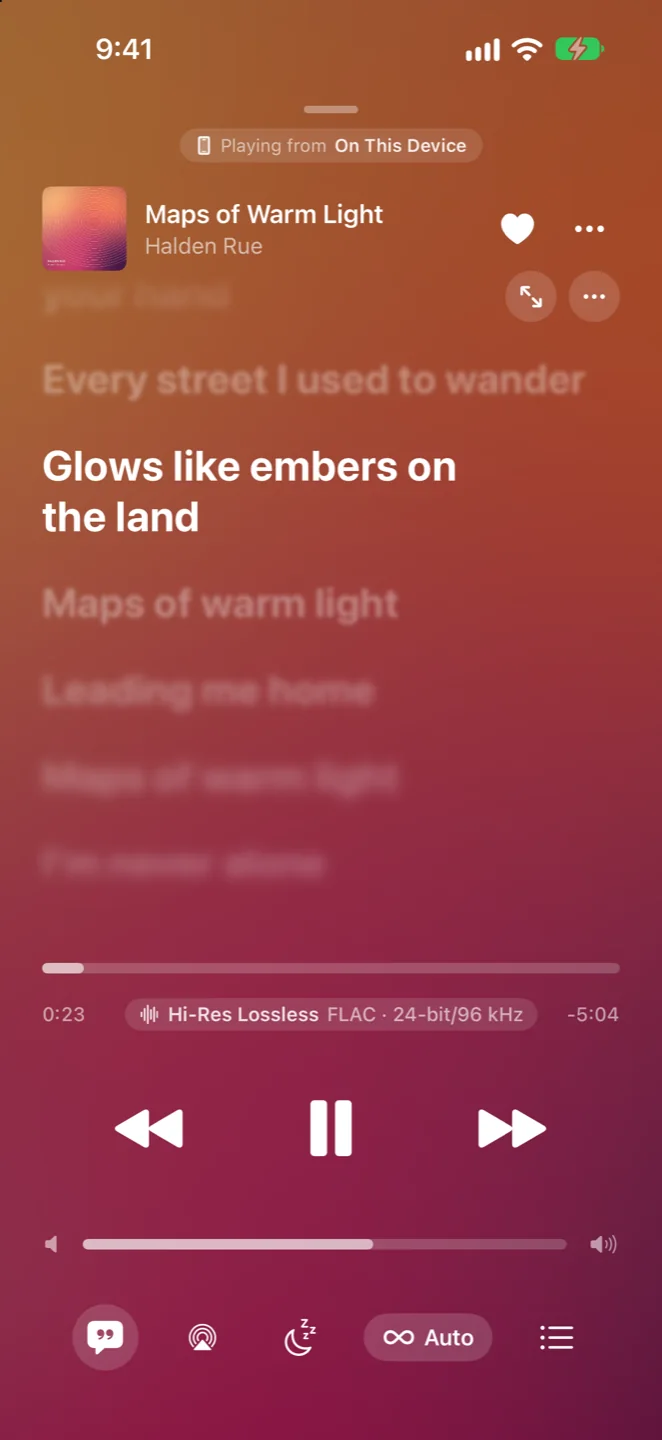
Synced lyrics in Sonevia, the sung line in white and the others blurred
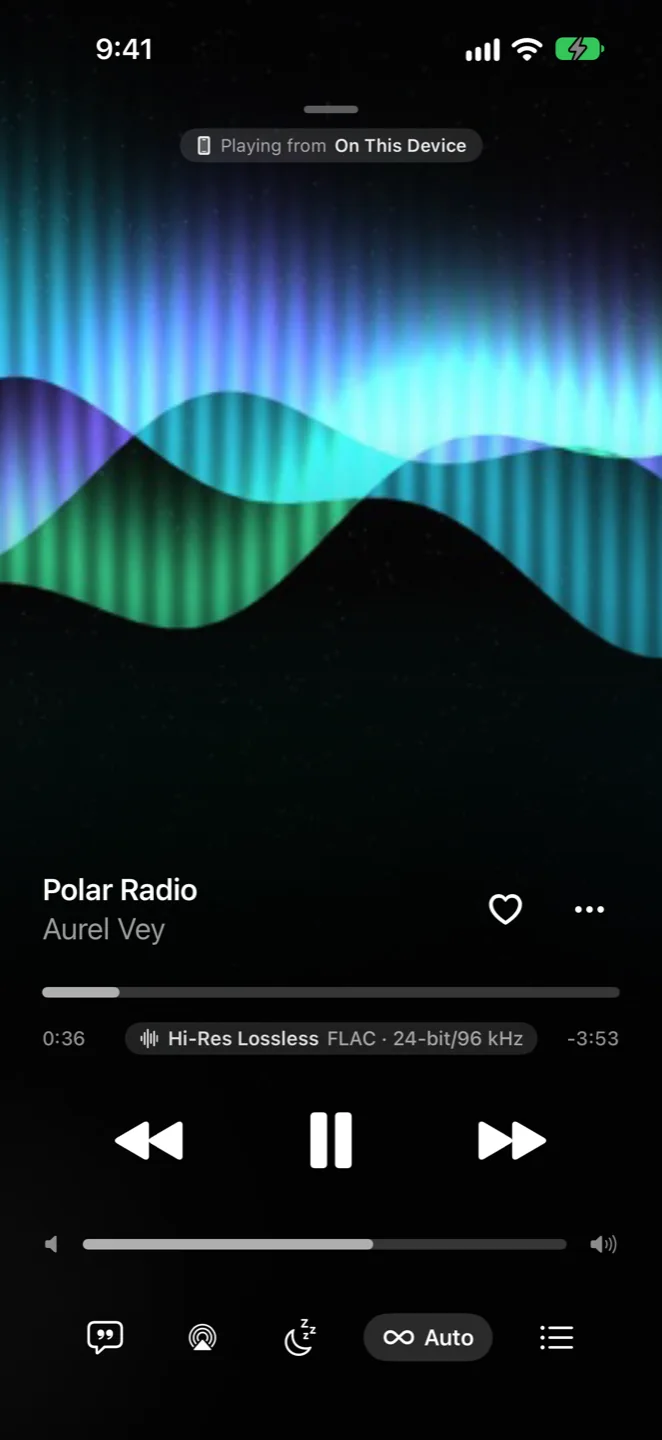
Sonevia's Now Playing screen with full-screen artwork, a Hi-Res Lossless FLAC 24-bit/96 kHz badge and playback controls
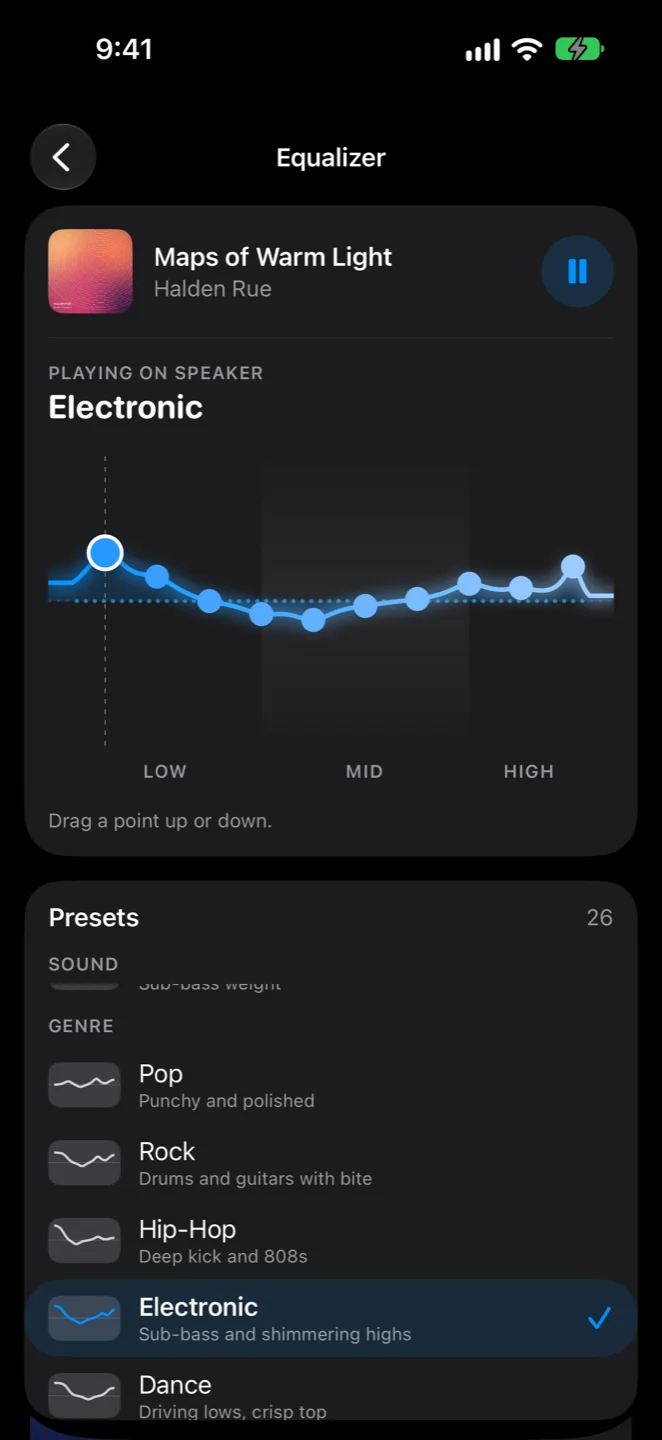
Sonevia's equalizer: a ten-point curve drawn over the music's live levels, with the Electronic preset chosen below
Your music, your way

Every place your music lives, in one library.

Sonevia doesn't ask you to move anything. It plays your music where it already is, and keeps track of which copy you're hearing.

  • Your folders, read in placeAdd folders from Files, iCloud Drive or another provider, or copy music into Sonevia's own folder. Nothing is duplicated, and removing a folder never deletes a file.
  • Your own serverNavidrome and other OpenSubsonic servers, Jellyfin and Plex Media Server: browse, stream and download, with favourites, ratings and playlists kept in step both ways.
  • Apple Music beside itWith your own subscription, Apple Music songs share the queue, and the copy in your library always plays instead when you have one.
  • One searchYour library and Apple Music in their own tabs, with the closest matches when a title is half remembered.
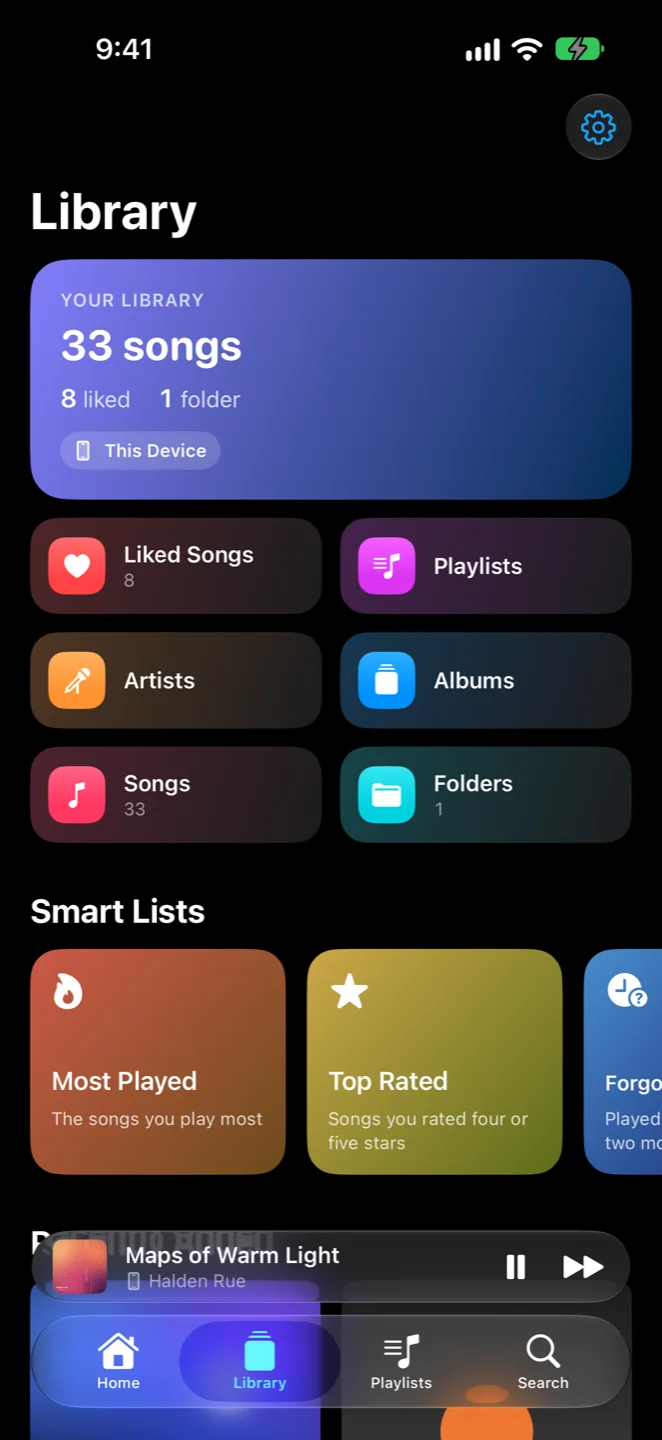
Sonevia's Library: a summary card, coloured tiles for Liked Songs, Playlists, Artists, Albums, Songs and Folders, and smart lists
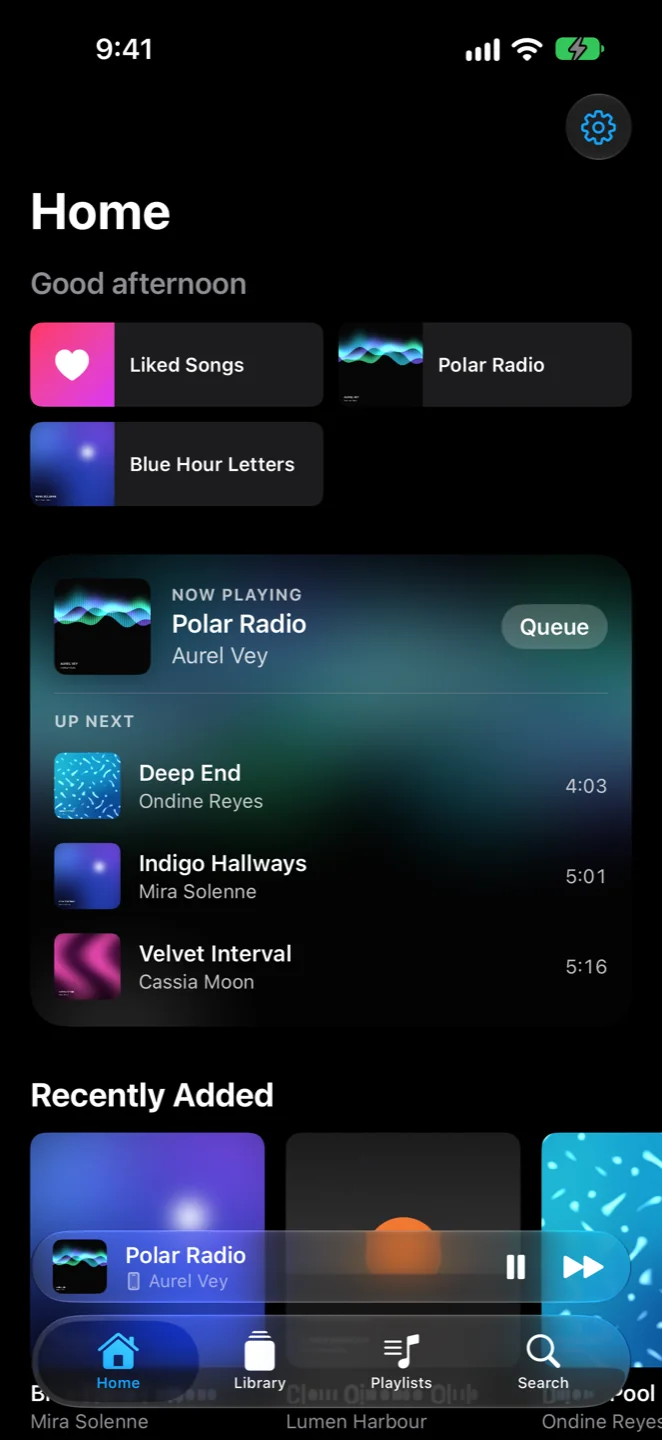
Sonevia's Home: quick picks, Now Playing with Up Next, and Recently Added
Audio Lab and equalizer

An equalizer that shows its work.

Shape the sound for your headphones, then see exactly what happens between the file and your ears.

  • A ten-band EQ you can drawDrag the curve while the song plays and hear it change without a click, smoothly under your finger. 26 presets and a preamp.
  • Parametric, up to 64 filtersPeaking, shelves, band-pass, notch, and high and low cuts from 12 to 48 dB, with frequency, gain and Q for each.
  • Find Your HeadphonesThousands of headphone corrections from the AutoEq project, searched on your device and turned into a profile.
  • A profile for every outputAirPods, wired headphones, the speaker and a USB DAC each remember their own EQ.
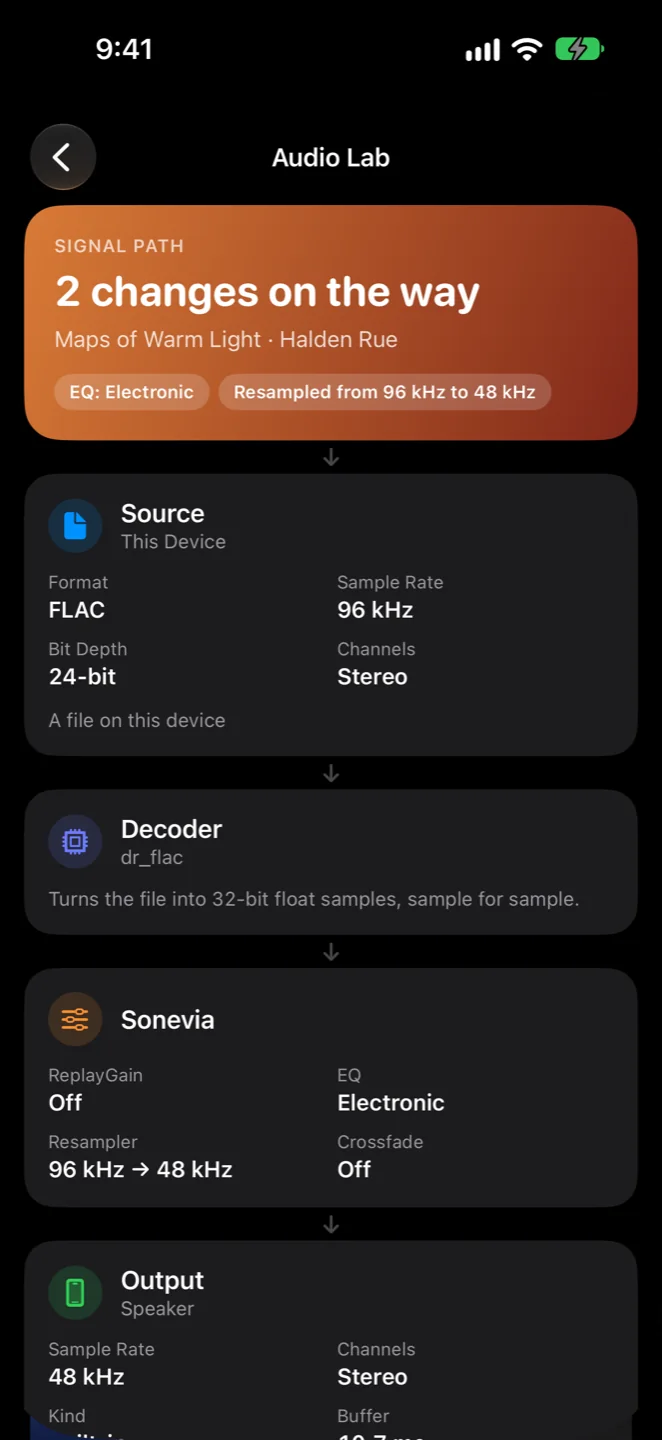
  • The Audio LabThe song's whole path: source, decoder, resampling, gain and EQ, then the output, with loudness, true peak and dynamic range. It never claims "bit-perfect".
The equalizer's drawn curve and presets
Sonevia's Audio Lab: '2 changes on the way', then cards for the source, the decoder and what Sonevia changes
Formats

Lossless, hi-res, and everything else.

Songs join without a gap, or crossfade from 2 to 12 seconds, while an album always stays gapless. A badge in Now Playing says what you're hearing.

  • FLAC
  • ALAC
  • WAV
  • AIFF
  • DSD
  • MP3
  • AAC
  • Opus
  • Vorbis
  • WMA
The listening experience

Feels like it belongs on your iPhone.

Native through and through: the controls are where you expect them, and the music keeps going when the queue ends.

  • Now Playing, immersiveThe artwork fills the screen, or loops as animated artwork made from a video.
  • Lyrics that follow alongSynced lines from the file, your server or LRCLIB. Lines away from the one being sung blur, and tapping a line jumps there.
  • A queue you controlPlay Next, Add to Queue, drag to reorder. The queue is still there after a relaunch, and a long song resumes where you left it.
  • Autoplay without guessworkWhen the queue runs out, Sonevia keeps going from your tags, likes, ratings, skips and what you play together. No AI: your own listening, worked out on your device.
  • Effects and AutoMixReverb, echo, crossfeed and more in a chain you build, even for one song. AutoMix starts a crossfade on a beat both songs share.
  • Everywhere the system reachesThe Lock Screen, Control Center, AirPlay 2 to one room or several, a sleep timer that fades out, and Bluetooth controls.
Immersive Now Playing with the artwork filling the screen
Synced lyrics over the song's colours
Sonevia for Mac

Your library, on the big screen.

A native Mac app with the same library, equalizer and Pro as on your iPhone. Buy Pro once and it works on every device.

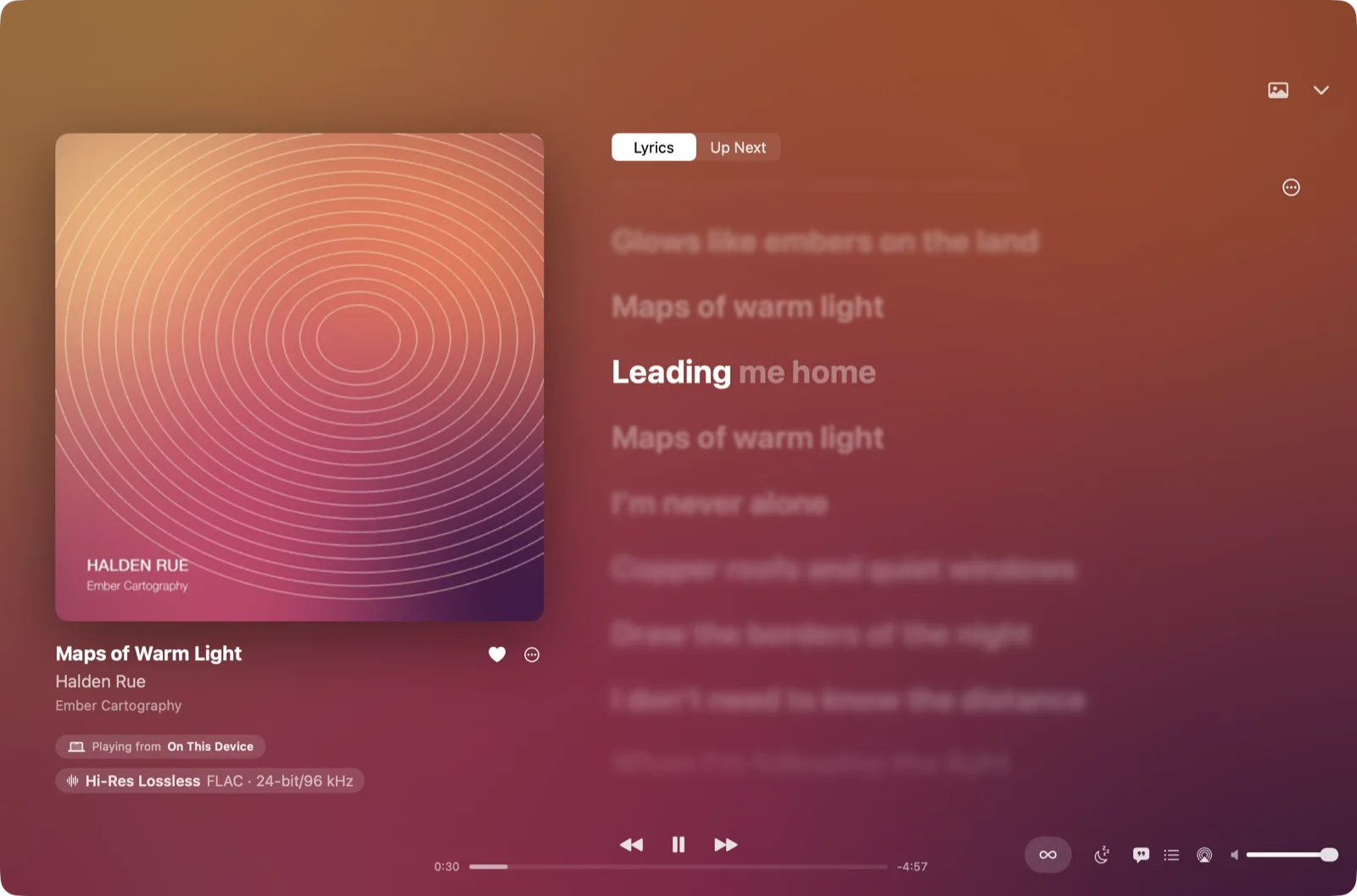
Sonevia for Mac: Now Playing with the album cover beside synced lyrics, the sung line in white

Made for the Mac

A sidebar for your library, smart lists and sound, a playback bar along the bottom, and the media keys and Control Center.
Your folders and servers

Add music folders from the sidebar, or connect Navidrome, Jellyfin, Emby or Plex, as on iPhone.

In step with iCloud

Likes, playlists, ratings, listening history and EQ profiles follow you between iPhone, iPad and Mac. Free, and on by default.
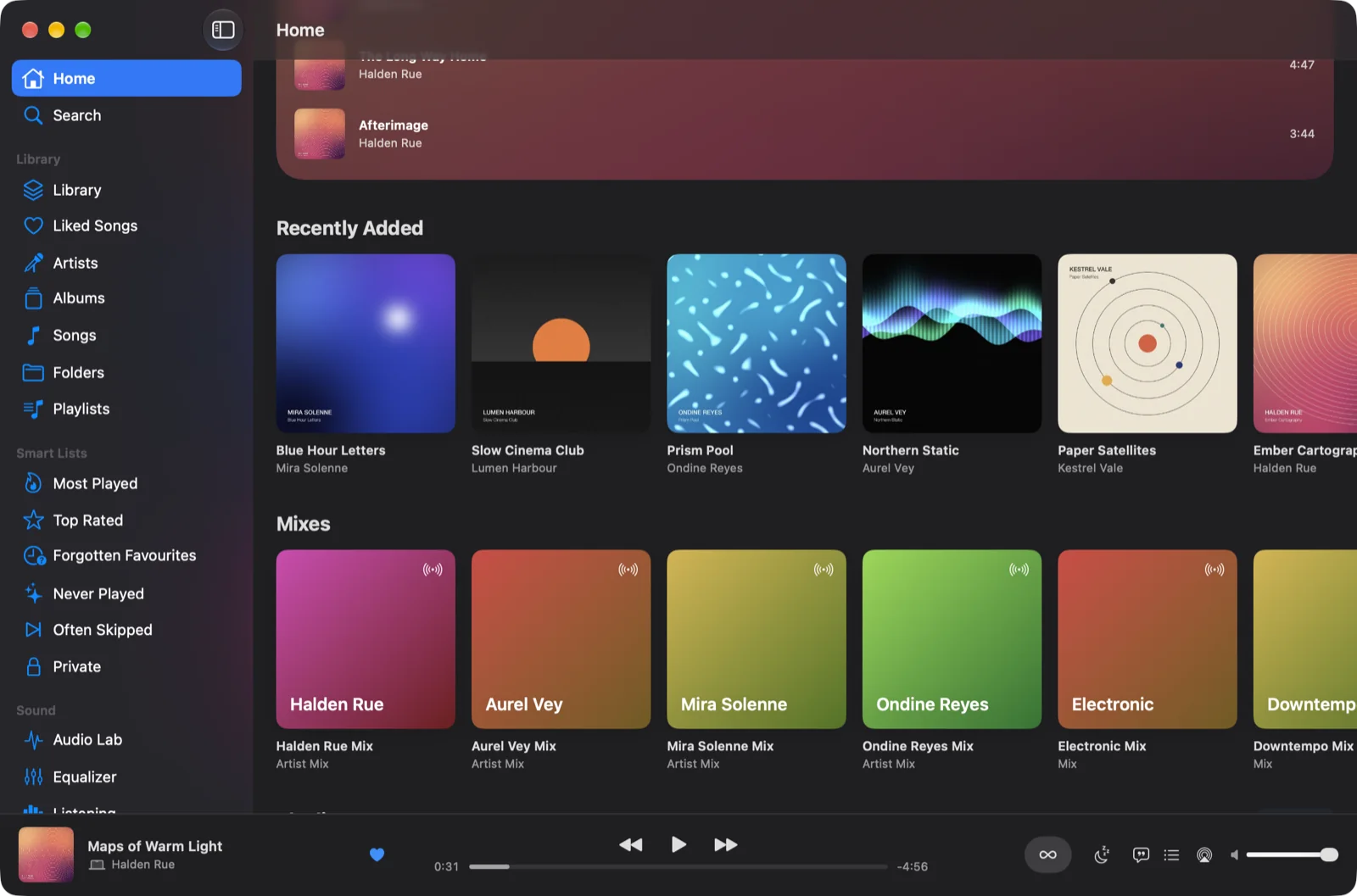
Sonevia for Mac: Home with Recently Added albums and artist mixes, and the sidebar on the left
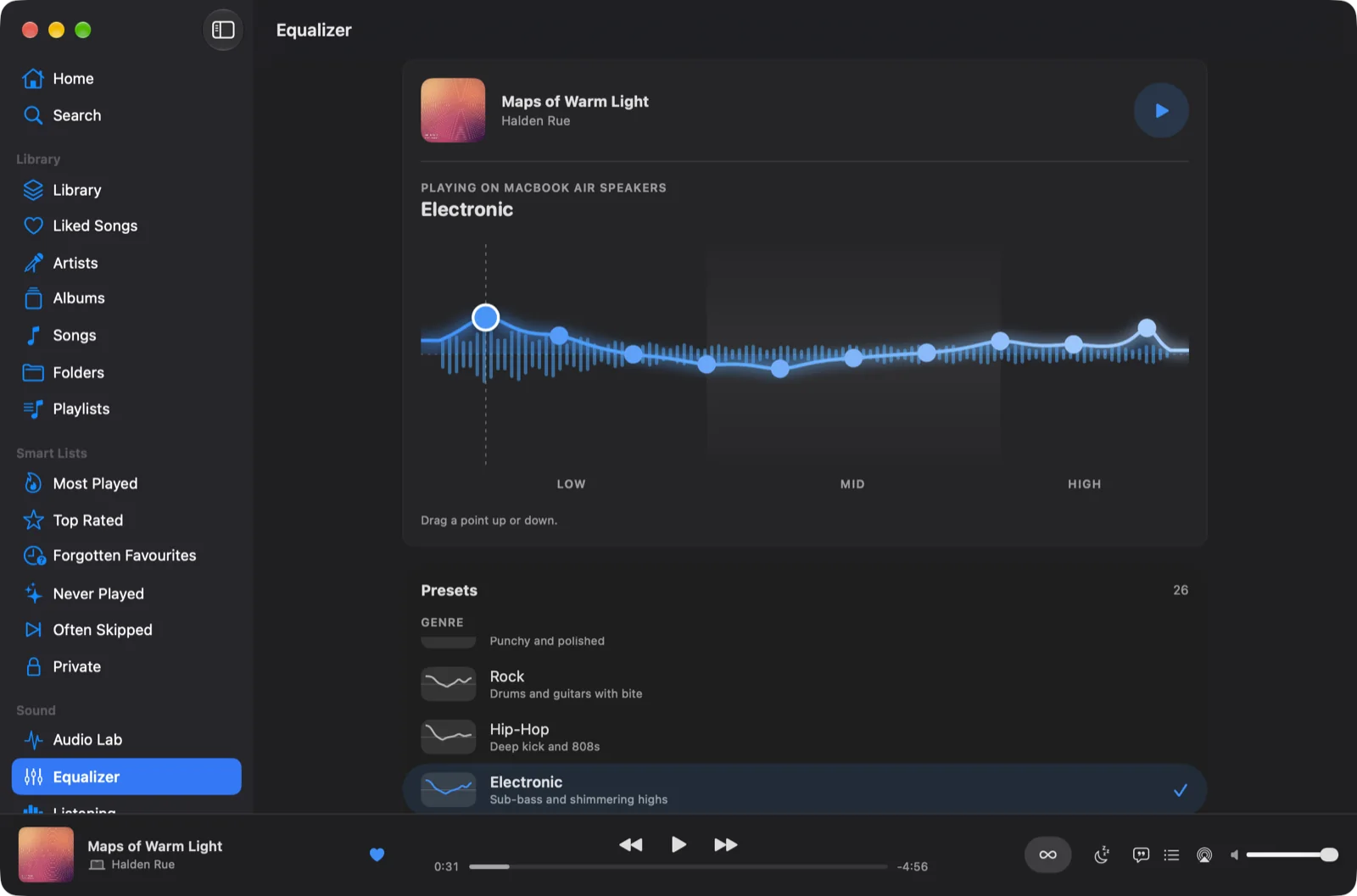
The equalizer on Mac: the drawn curve over live levels, playing on the MacBook Air speakers, with presets below
iPad, CarPlay, Apple Watch, iCloud

Wherever you listen.

One app for iPhone, iPad and Mac, with CarPlay in the car, a remote on your wrist, and iCloud keeping them in step.
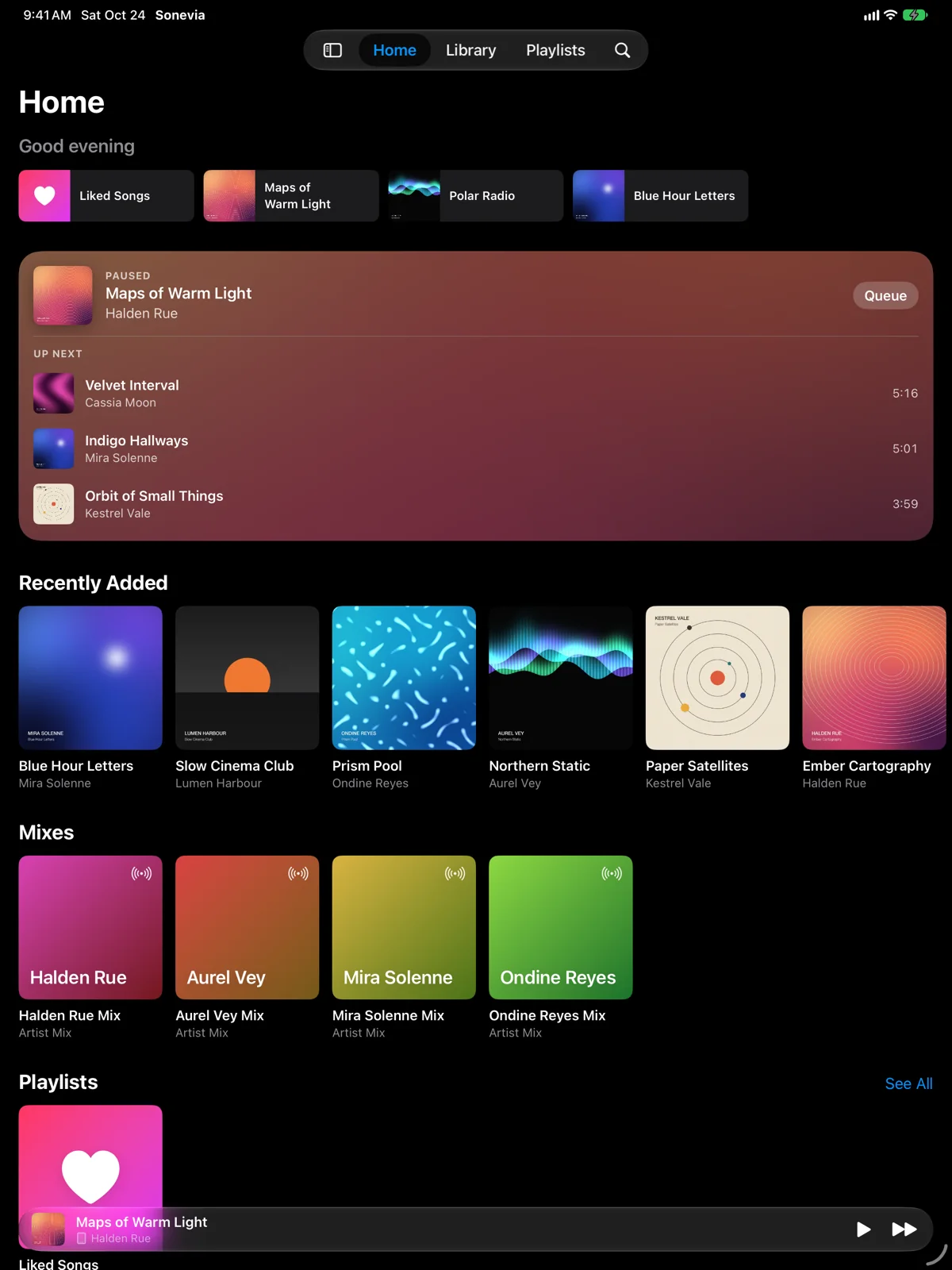
Sonevia on iPad: Home with quick picks, Now Playing with Up Next, and Recently Added
  • iPadA layout made for the larger screen, in every orientation, with lyrics beside Now Playing.
  • CarPlayHome, albums, artists, playlists and downloads, with the song's quality beside its cover.
  • Apple WatchPlay, pause, skip, change the volume and like a song from your wrist.
  • Five languagesEnglish, Japanese, German, French and Spanish, chosen on the first screen or in Settings.
  • Widgets, Siri and ShortcutsNow Playing on the Home and Lock Screen; play a mix, a playlist or liked songs from Siri, Shortcuts or the Action button.
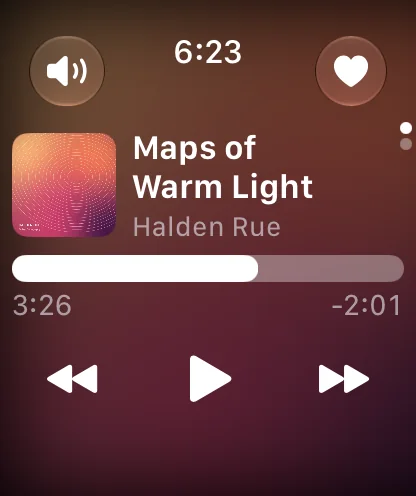
Sonevia's Now Playing remote on Apple Watch
Built for your library

More than a music player.

Tools for people who keep their own collection, and want it right.

Offline, on your terms

Download songs, albums and playlists from your server, or let Sonevia keep your liked songs and most played downloaded on Wi-Fi, within a space limit you set.

Library Health

Finds songs that won't play, missing artwork and tags, lossy files in lossless albums and duplicates, and says how to fix each.

Edit Info and Edit Tags

Correct a title, artist or cover just for Sonevia, or write tags into your files, checked before the original is replaced.

Listening history

Every play is kept on your device: top songs, artists and genres, and monthly and yearly recaps you can share.

A private section

Hide songs, albums or artists behind Face ID. Their plays aren't recorded or scrobbled, and they never appear in widgets, CarPlay or Siri.

Smart lists and mixes

Most Played, Top Rated, Forgotten Favourites and more, plus mixes grown from a song, album, artist or genre.

New in 0.9.9

Ready for the App Store.

Sonevia 0.9.9 is the first App Store release, on 1 November 2026. It brings everything TestFlight testers have tried since October.

Sonevia for Mac

A native Mac app, with one Pro purchase for every device.

iCloud Sync

Likes, playlists, ratings and history in step on all your devices.

Effects and AutoMix

Your own sound chain, and crossfades that start on a shared beat.

AirPlay 2 and Emby

HomePod and several rooms at once, and Emby beside Navidrome, Jellyfin and Plex.

Five languages

Japanese, German, French and Spanish join English.

Steadier

Damaged files can't freeze it, larger text fits everywhere, and the EQ follows your finger.

Privacy

Your library stays yours.

Sonevia has no accounts, no advertising, no analytics and no tracking. Your library, playlists and listening history are kept on your devices, and iCloud Sync uses your own private iCloud, which the developer can't read. Sonevia talks only to the services you choose, and the developer never receives your music or your library.

Hear your music the way you keep it.

Free to start, with a seven-day trial of everything in Pro.

Coming to the App Store1 November 2026What's in Pro